
Most input-automation libraries are designed to perform actions instantly. This can be useful when making code to complete a task as quickly as possible but can result in unpredictable behavior when actions are performed faster than a program can process them. Some libraries try to address this situation by allowing a specified duration for each command. They still execute the same precise, robotic actions, just slower. Slowing down inputs in this way can help prevent a program from getting overloaded, but it still requires every timing to be specified manually and fails to capture the smooth nature of real human motion.
I created Human Input to add a layer of realistic movement and timing to Python automation while remaining simple to use. The library is built on top of the familiar mouse and keyboard packages, preserving their core interfaces while adding generated mouse trajectories, naturally timed clicks, and keyboard events modeled from real keystroke data.
The project is open source and available through GitHub and PyPI.
Mouse Movement
Moving a cursor naturally involves more than drawing a curved line between two points. People generally make a fast initial movement toward a target, followed by one or more smaller corrections as they approach it. The time required also depends on both the distance to the target and the size of the area being selected.
Human Input estimates movement duration using Fitts’s law, a model of the speed–accuracy tradeoff in human movement. A distant or small target takes longer to get to than a nearby or large one, even if their paths look similar.
The library then:
- Moves the intermediate and final points to random positions within the target regions
- Adds small corrective movements near the destination
- Joins the points using smooth spline curves
- Generates overlapping, lognormal velocity profiles for each portion of the movement
- Produces timestamped cursor positions that can be executed by the underlying
mouselibrary
The trajectory construction was informed by the Sigma-Lognormal model of rapid human movement. My implementation is not intended to reproduce the complete biomechanical model; instead, it applies its most useful ideas to create paths with realistic acceleration, deceleration, curvature, and correction.
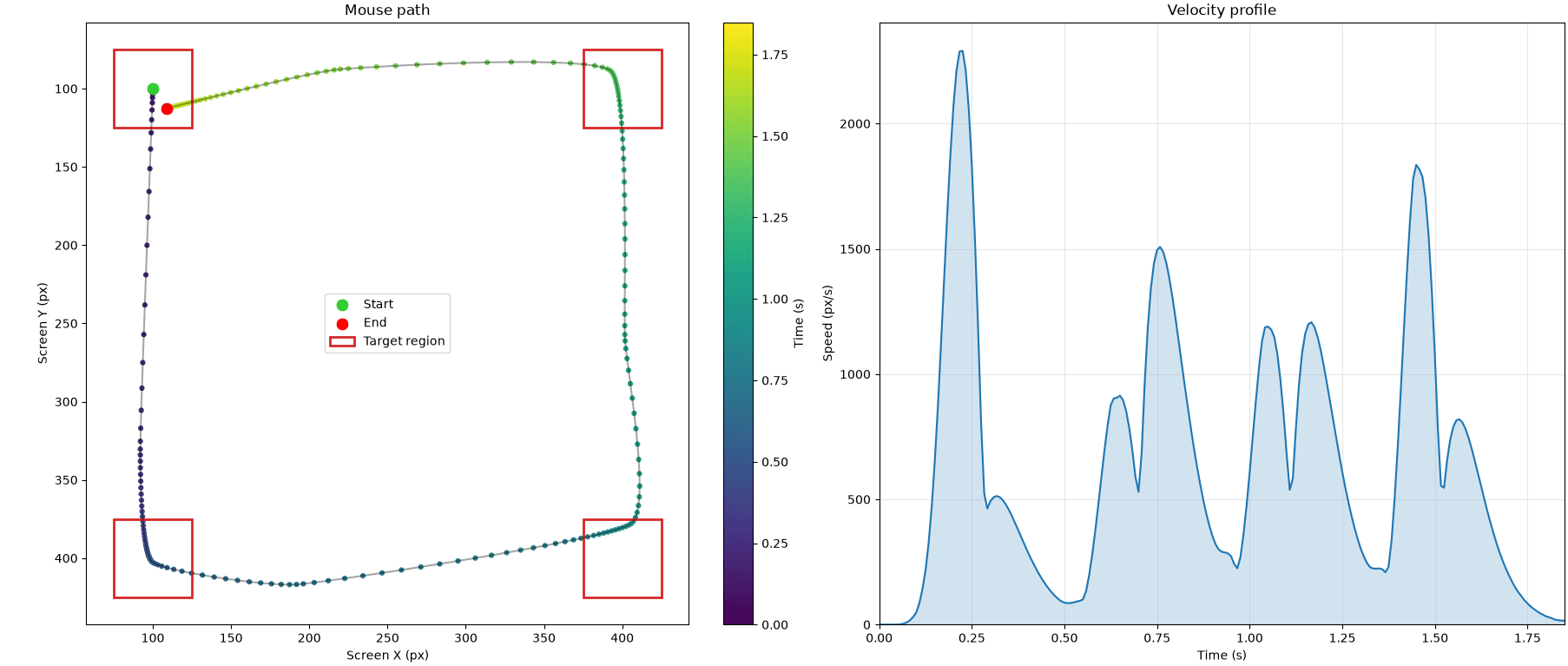
The same generator can move through multiple waypoints as one continuous trajectory. I also added a Matplotlib visualization tool that plots the path, waypoint regions, and velocity profile, making it possible to inspect the generated motion instead of judging it only by watching the cursor.
Mouse Clicks
Real clicks have measurable timing between the button press and release, as well as between the individual clicks of a double-click. These intervals are not constant and are not distributed evenly.
Human Input samples click press, release, and inter-click delays from lognormal distributions. I derived the distribution parameters from observations in the Mouse Dynamics Dataset for Behavioral User Substitution Detection in Electronic Testing. Single clicks and the first and second clicks of a double-click were analyzed separately so each operation could use timing representative of the source data.
Keyboard Input
Typing is generated as a sequence of individually scheduled key-down and key-up events. Two timing measurements are sampled for each character:
- Flight time: the interval between pressing one key and pressing the next
- Hold time: the interval between pressing and releasing a key
Treating these values independently is important. A fast typist may press the next key before releasing the previous one, producing the natural key rollover that is lost when automation simply presses and releases one character at a time.
The bundled timing distributions were created from the Timing Distributions in Free-Text Keystroke Dynamics Profiles dataset. The library stores separate distributions for individual ASCII character codes and falls back to general timing models for characters that are not represented in the dataset.
Uppercase letters and shifted symbols are handled by explicitly scheduling the Shift key around the associated character. All generated events are sorted by their execution times before being sent, allowing Shift timing and multi-key overlap to occur without sacrificing the event-based structure of the library.
Adjustable Speed
“Human-like” does not mean there is only one valid speed. The library includes profiles ranging from VERY_SLOW to SUPERHUMAN, along with separate scaling controls for mouse movement, mouse clicks, and keyboard input.
These profiles scale the generated timing while preserving the variation and relationships within it. A faster setting therefore does more than divide every delay by the same arbitrary number: the resulting action still retains the acceleration, rollover, and timing differences that make it appear organic.
Sources
This project required research in several areas: human motor control, probability distributions, trajectory generation, and analysis of real behavioral datasets.
The primary references used during development were:
- Paul Fitts’s research on the relationship between movement distance, target size, and selection time
- Réjean Plamondon’s work on the Sigma-Lognormal model of rapid human movement
- Mouse Dynamics Dataset for Behavioral User Substitution Detection in Electronic Testing
- Timing distributions in free text keystroke dynamics profiles